Steps to Recall Sent Email in gmail
Step 1- Login Gmail Account
Step 2 – Click on Setting
Step 3 – Click on All Setting
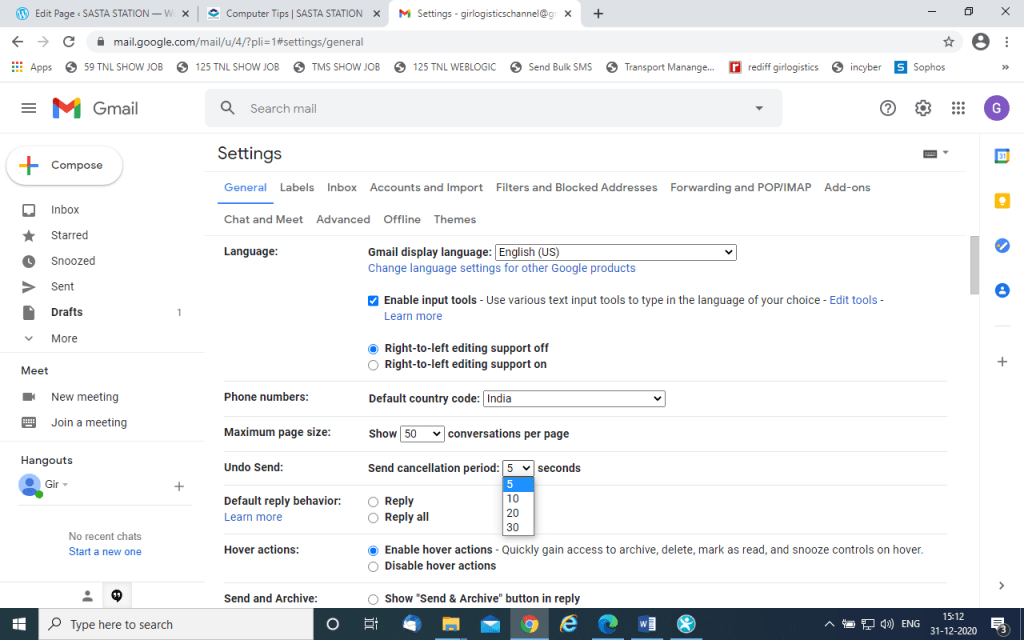
Step 4 – Go to Undo Sent option Your will see default undo time of mail is 5 second.
Step 5- Increase 10 or 20 second undo time and scroll down the page and click on save button.
Now your When you send email you will see the undo button after send email till 20 second. click click on undo to Rcall your Sent Email
See Time Setting in below Snapshot
 COMPUTER STATION