How to add another email address to your existing Gmail account
Open Gmail Account.
Click on Setting Option from Top Right Corner
Go to Account and Import TAB on TOP Row of setting
Go to Send Email as Option and Click add another email address.
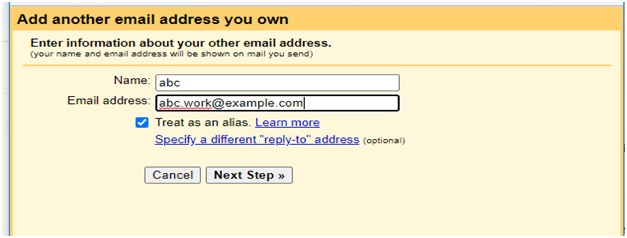
A popup dialog box will be displayed.
Enter Name and email address
Click checkbox on “Treat as an alias. (If you do not do this then incoming mails from this email will not be received and displayed in your gmail account.
You can also set reply-to option , from which email id you want to reply
Click on Next Step Button
Setup your setup your SMTP Server, User name, password, SSL option and port numbers
Click add Account .
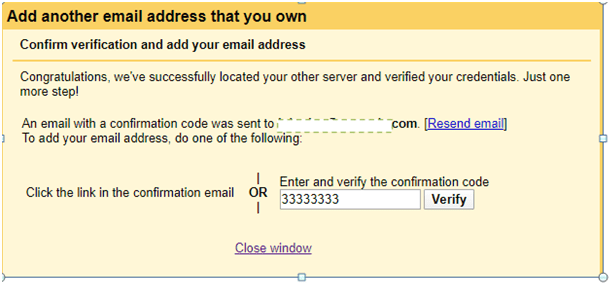
Now, Gmail will automatically send a verification code to the linking email.
Enter code and click on verify button
After this step Gmail will update the page and you can see linked email id in the send message field
You can add maximum 99 email address in your Gmail account and operation from the same Gmail.
You can Create Email from your added email from here.
Click on the poll block above to edit it directly in this post. Add a question, and multiple answers and even change the styling of the block using the sidebar controls. Add new poll blocks by searching for “poll” or type “/poll” in a new block.
This Method of Activation is alternative option of Microsoft . Using This method Microsoft couts the no of system using this product.
Step -1
Just Copy Below Text in notpad and Save as office.cmd
@echo off title Activate Microsoft Office 2013 Volume for FREE!&cls&echo ============================================================================&echo #Project: Activating Microsoft software products for FREE without software&echo ============================================================================&echo.&echo #Supported products:&echo – Microsoft Office 2013 Standard Volume&echo – Microsoft Office 2013 Professional Plus Volume&echo.&echo.&(if exist “%ProgramFiles%\Microsoft Office\Office15\ospp.vbs” cd /d “%ProgramFiles%\Microsoft Office\Office15”)&(if exist “%ProgramFiles(x86)%\Microsoft Office\Office15\ospp.vbs” cd /d “%ProgramFiles(x86)%\Microsoft Office\Office15”)&echo.&echo ============================================================================&echo Activating your Office…&cscript //nologo ospp.vbs /unpkey:92CD4 >nul&cscript //nologo ospp.vbs /unpkey:GVGXT >nul&cscript //nologo ospp.vbs /inpkey:KBKQT-2NMXY-JJWGP-M62JB-92CD4 >nul&cscript //nologo ospp.vbs /inpkey:YC7DK-G2NP3-2QQC3-J6H88-GVGXT >nul&set i=1 :server if %i%==1 set KMS_Sev=kms7.MSGuides.com if %i%==2 set KMS_Sev=kms8.MSGuides.com if %i%==3 set KMS_Sev=kms9.MSGuides.com if %i%==4 goto notsupported cscript //nologo ospp.vbs /sethst:%KMS_Sev% >nul&echo ============================================================================&echo.&echo. cscript //nologo ospp.vbs /act | find /i “successful” && (echo.&echo ============================================================================&echo.&echo #My official blog: MSGuides.com&echo.&echo #How it works: bit.ly/kms-server&echo.&echo #Please feel free to contact me at msguides.com@gmail.com if you have any questions or concerns.&echo.&echo #Please consider supporting this project: donate.msguides.com&echo #Your support is helping me keep my servers running everyday!&echo.&echo ============================================================================&choice /n /c YN /m “Would you like to visit my blog [Y,N]?” & if errorlevel 2 exit) || (echo The connection to my KMS server failed! Trying to connect to another one… & echo Please wait… & echo. & echo. & set /a i+=1 & goto server) explorer “http://MSGuides.com”&goto halt :notsupported echo.&echo ============================================================================&echo Sorry! Your version is not supported. :halt pause >nul
Select file type as All files and click on save.
Now your file is created.
Step – 2
After Installing Office 2013 Right lick on file and select Run as Administration.
After that file Run in command prompt you can see the practical of all these step in our YouTube Channel. click below link of Computer Station Channel.



 COMPUTER STATION